Official Ross-Tech VCDS Diagnostics Tools UK

Dealer-level vehicle diagnostics for your vehicle at home or in your workshop.

☑️ Official Ross-Tech Distributor
☑️ UK Support & Warranty
☑️ Works on 2000+ models

The UK's Premier Distributor of Ross-Tech Systems — Powered by V-Tech

Shop VCDS Diagnostics Products

Our Best-Selling VCDS Interfaces

Delivered Straight To Your Door

Why Choose VCDS for VW, Audi, SEAT & Skoda?

We offer a large range of high quality VCDS diagnostic tools by Ross-Tech, powered by V-Tech. Our products provide guaranteed effective results when diagnosing faults in your vehicle. Now there is no need to take you car to a garage, shop our products, ranging from extension cables to our premium professional kit, find a product that is right for you and diagnose your car at home.
quick links 1
Car
Information
quick links 2
Download
VCDS Software
quick links 3
Registration Instructions
HEX-NET
quick links 3
Registration Instructions
HEX-V2
quick links 4
Online
Demo Manual
quick links 5
Ross-Tech
Wiki

VCDS Diagnostics – Access Specific Vehicle Data Instantly

We offer a large range of high quality VCDS diagnostic tools by Ross-Tech, powered by V-Tech. Our products provide guaranteed effective results when diagnosing faults in your vehicle. Now there is no need to take you car to a garage, shop our products, ranging from extension cables to our premium professional kit, find a product that is right for you and diagnose your car at home.
vcds mockup 1
vcds mockup 1

Professional Vehicle Diagnostics From Home or Workshop

VCDS is a powerful yet user-friendly diagnostic solution designed to save both time and money. Instead of relying on trial-and-error repairs or costly garage visits, VCDS empowers you to diagnose, adapt, and optimise your vehicle with confidence. With VCDS, you can perform advanced functions such as fault code clearing, coding, adaptations, and performance optimisation — all from the comfort of your home or workshop. This makes VCDS a cost-effective and reliable alternative to dealership diagnostics. Explore our range of VCDS interfaces today and experience professional-grade vehicle diagnostics built specifically for VW Group vehicles.

The Next Generation of Vehicle Diagnostics

VCDS Release 19.6 is now available on our Download Page . This version includes preliminary support for new 2020 model cars, as well as a number of other enhancements and improvements. This release works with all genuine Ross-Tech interfaces made since 2004, but support for 2019 and newer model cars requires a current generation interface. Upgrades for registered users of older interfaces are available.

Frequently Asked Questions about VCDS

Will VCDS work with my car?

VCDS and VCDS-Mobile will work with most Volkswagen and Audi models sold World-Wide 1994 through the current model year. It will work with some cars all the way back to model year 1990. It will also work with most late-model SEAT, and Skoda models sold in markets other than North America. If your VW or Audi has a 16-pin “OBD-II style” Data Link Connector,  VCDS will definitely work.  If your car has the old “2×2″ Data Link Connection, check if there is a wire going to each pin, as shown in the picture. If there are four wires, VCDS should work with any diagnostics-capable modules that are present.  If there are only three wires, then nothing in the car is diagnostics-capable..  Please see these Application Charts where you can select your model and see which modules can communicate with VCDS.  Also see the Issues page for a few things that may not work as expected.   If in doubt, e-mail us.

Will VCDS work even if my car is chipped?

Yes.  If it doesn’t work in a “chipped” car, the chip-vendor did something seriously wrong! Chips from reputable vendors do not interfere with diagnostic functions so if the factory scan tools can “talk” to the ECU, then VCDS should be able to as well.

What functions are included in the current release?

Please see the Function Chart for the current feature set. We strive to keep VCDS updated to work with the latest vehicles and functions. The objective is to allow users to perform the same diagnostic functions that are performed by the VW/Audi factory scan tools, using instructions found in the factory repair manuals.

What are the computer requirements

VCDS requires a computer running Microsoft Windows (the HEX-NET can be used with VCDS-Mobile on other platforms but that use is still in beta testing). A Laptop is most convenient but a desktop PC can also be used.
We recommend a PC running Windows 7, 8.1, or 10 with at least 2GB of RAM (single-core Atom�-class processors are no longer recommended and devices with ARM CPUs are NOT SUPPORTED). Screen resolution of at least 800×600 is recommended.
If you are using a power supply for a laptop, it should be one specifically designed for that purpose, NOT a “universal” adapter.
Systems running Windows in a virtualized environment (for example Virtual PC on a Mac) are not supported. See also Question 1.8.

Should I get a serial or a USB Interface?

This depends primarily on the PC you’re planning to use:

If you’re using a modern PC running Windows XP or newer, then you should probably get a USB interface. Although USB interfaces are no faster than serial versions, it’s becoming increasingly difficult to find new PCs with serial ports, so a USB interface is more future-proof.

If you’re using a PC running an older version of Windows or with a CPU speed of less than 1GHz, we recommend a Serial interface. Obviously a serial interface requires a Serial Port which looks like this:

Observe the port we surrounded with the GREEN oval. Notice the 9 male pins? That’s a Serial port. Observe the port circled and crossed in RED. Notice the 15 female pins? That is a Monitor port and will not work!

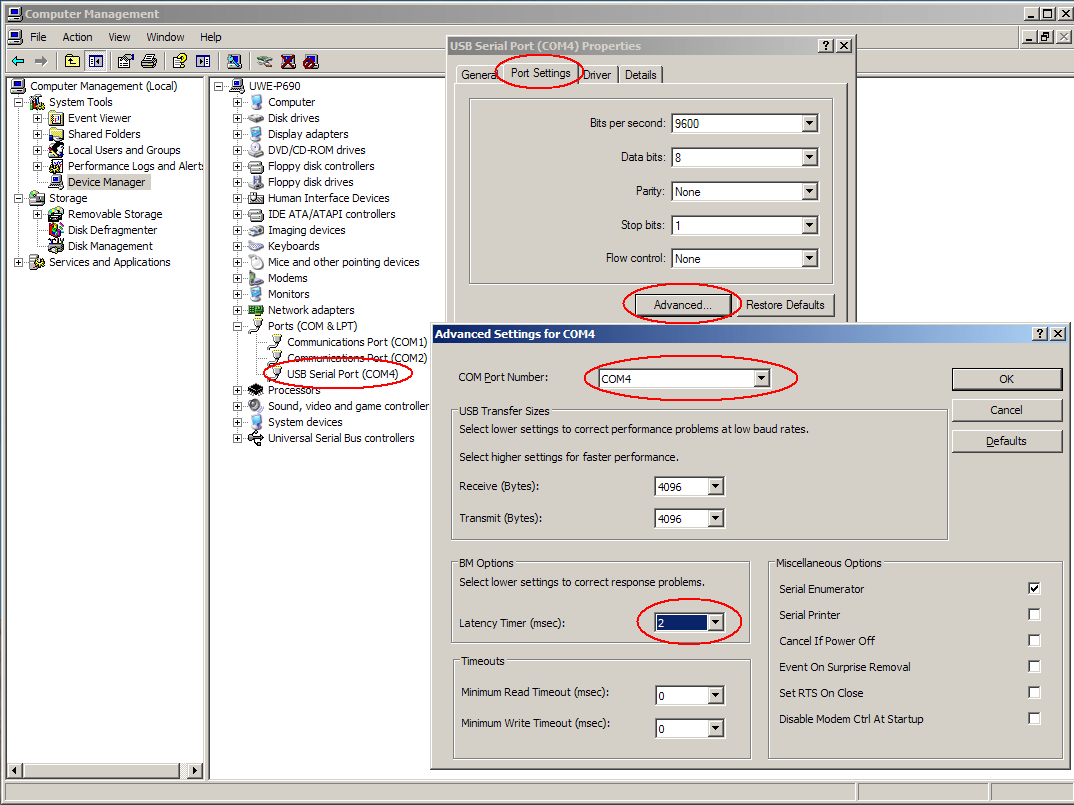
Many generic USB<->Serial converters are unable to handle the baud rate and timing requirements that are demanded by some control modules using the VAG protocols.  If you wish to use a USB<->Serial converter, we recommend that you get one with an FT232B or FT232R chipset.   It is essential to configure the virtual COM port that it creates to be in the range of COM1 to COM4, and to set the Latency timer to 2.  See this screen-shot as a guide to configuring these devices.  Please understand, this is a recommendation only; if you purchase your own USB<->Serial converter, please do not expect us to support it.

For registered users with HEX-COM or HEX-COM+CAN interfaces, we used to supply a modified FT232B based USB<->Serial converter, which is compatible with the “Direct” drivers provided with VCDS version 10.6 and newer, and is fully supported by us.  Once “married” to your interface, these converters provided the exact same functionality as our HEX-USB or HEX-USB+CAN interfaces. However, this “marriage” requires a revised license to be loaded in the interface, so the initial installation is not just plug-an-play. If you are registered user with a HEX-COM or HEX-COM+CAN interface and no longer have a PC with a serial port, please contact our Sales Department for trade-in options.

What if the PC I wish to use with VCDS doesn't have internet access?

Except for the Pro-Kit, our software is provided to you via our download page, rather than a disk, so you will need a way to transfer the Self-Installing EXE file to the PC that you will be using with VCDS. The file fits easily on a removable USB drive and can also be burned onto a CD-R or CD-RW. Make sure that you do not run the EXE file until you have copied it onto the PC where you would like VCDS to be installed. Since software updates are provided only through our website, you should plan on repeating this transfer process to keep current. You do not need to be connected to the Internet while using VCDS.

Can I use VCDS on a desktop computer?

Yes, but you will probably need an extension cable for your interface if the PC is more than 6 feet from the car’s diagnostic port.. We stock Serial extension cables 15′ (3m) length. You can extend a Serial interface up to 50′. See the Accessories section of our Store for pricing. We stock a 16-ft Active USB Extension. You can extend a USB interface up to 32′ with two of these. We do not sell or support any other brands or models of USB extensions. If you have problems with a different brand of USB extension, the first thing we’re going to tell you is to eliminate the extension.

Will there be a Mac or Linux version?

There will be no “native” Mac or Linux versions.  The time and effort required to “port” VCDS to these platforms would never be worthwhile.     VCDS works fine on Apple Mac computers that have Intel processors (all modern Macs) when Windows is installed on them using Boot Camp.    Most computers that are used to run Linux can also boot Windows.     If you do not wish to install Windows, we now offer a platform-independent version of VCDS called “VCDS-Mobile“.

Will there be a version for iPhone / iPad / Android?

We have no plans to make a native “Application” for any of these platforms.   Instead, we are have created a platform-indendent version of VCDS called “VCDS-Mobile“.   It can be used on modern versions of any of the above smart-phones and tablets.

What's the difference between VCDS and and an OBD 2 Scan tool?

OBD-II is a government mandated diagnostic protocol that is primarily aimed at diagnosing emissions-related problems.   An OBD-II scan tool will work in many different brands of cars.  VCDS uses VW’s proprietary diagnostic protocol and is only designed and supported for use in VW/Audi vehicles.  Although you can use an OBD-II Scan Tool in an OBD-II compliant (1996 or newer) VW or Audi, an OBD-II Scan Tool can only talk to the engine, not the numerous other “intelligent” systems in the car.   Want to reprogram your central locks or your Radio?  Diagnose a problem with your ABS, Airbags, or Automatic Transmission?  Re-align your Immobilizer after swapping ECU’s?  Reset your Service Reminder Indicators?   Communicate with a pre-1996 model (not OBD-II compliant) car?  An OBD-II Scan-Tool can’t do any of these things. Please see our OBD-II Page for information on using the Generic OBD-II function in VCDS. Want some reasons to choose VCDS over a generic OBD-II scan tool? See this Real World Comparison.